FileCura Pack Add-on for FileCura · Requires the free FileCura app.
Project Steward Pack · Add-on for FileCura

Never lose a project again.

Six Finder Quick Actions for people who work in projects. Snapshot a project for safe rollback, find every project under any folder, stage loose files into the right safe folder, and run git end-to-end without ever typing --force, --hard, or rebase. Unity, Xcode, Swift Package, Node, Rust, Python, Godot, or generic git — kind-aware throughout.

£29 One-time purchase · Lifetime license
Buy Project Steward Pack

After checkout your license arrives by email from licenses@filecura.com. Drag it onto FileCura to unlock. Prefer a bundle? See the two bundles below — Steward is included in the Complete Bundle at £45 (every paid pack, 46% off).

Workflows 6 Quick Actions
Surface Finder right-click + in-app wizards
Privacy Local-first
Safety Never touches editor-managed folders
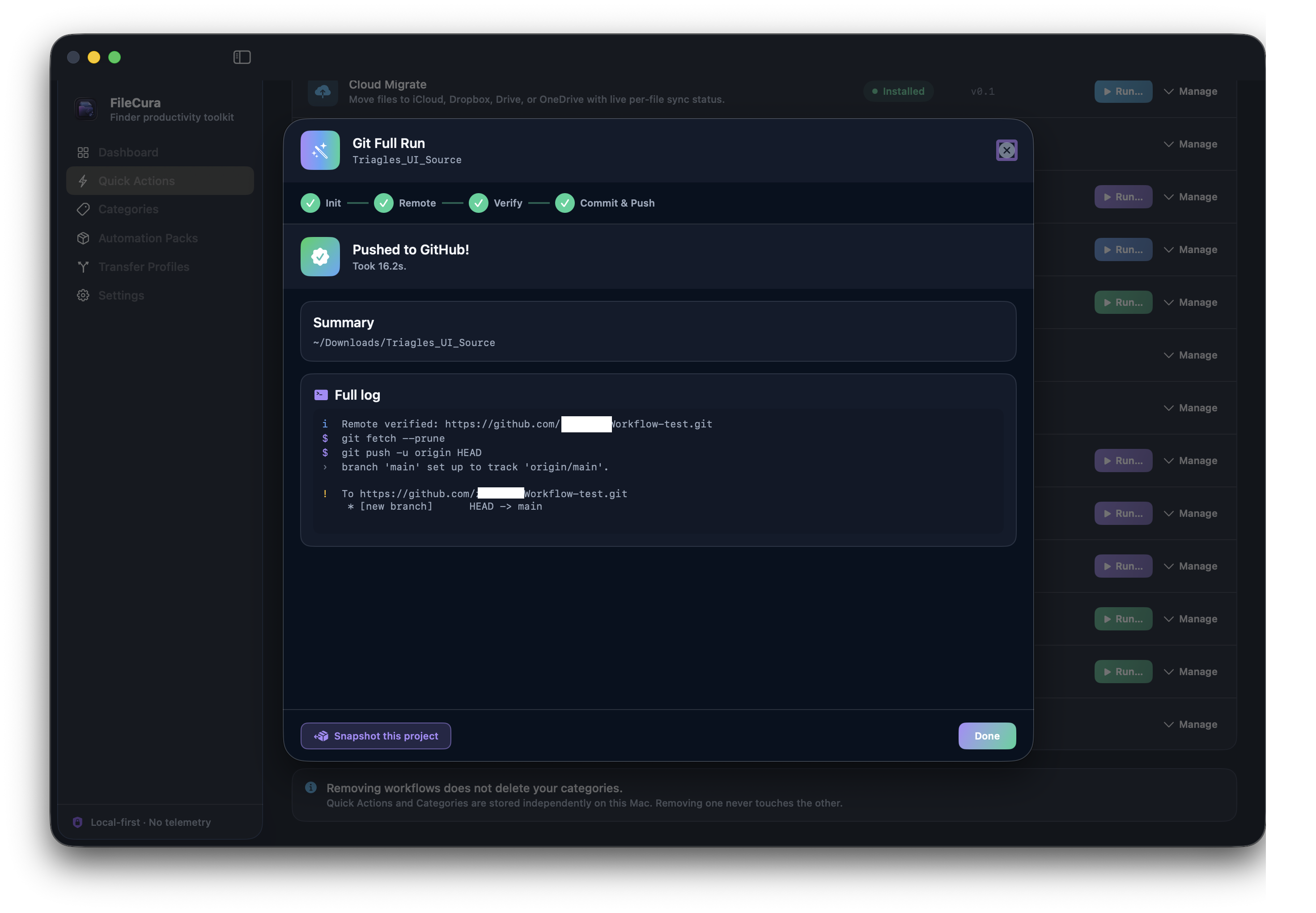
Git Full Run wizard — Pushed to GitHub! with full log of fetch, push, and remote verification.

Six workflows. One pack.

Each is a Finder Quick Action. Right-click a project folder or run them from inside FileCura.

Workflow 01

Project Snapshot

Zip a project for safe rollback. Detects the kind (Unity / Xcode / Node / Rust / Python / Godot) and excludes its derived paths (Library/, node_modules/, target/, etc.) so the archive isn't bloated by caches. Refuses backups to NAS drives — those have edge cases we'll handle in v1.1. ZIP or TAR.GZ; archive name carries date + project name; final summary shows files / source size / archive size / saved %.

Workflow 02

Project Detector

Find every project under one or more folders. Walks 4 levels deep, skips noise (node_modules/, .git/, DerivedData/), and surfaces a sorted-by-size list with kind badges. Smart matcher links loose files to the right project via filename token overlap (CamelCase aware) plus kind-affinity tie-breaking — .unitypackage prefers Unity, .xib prefers Xcode, etc. Pop the manual picker for anything the auto-matcher misses.

Workflow 03

Stage & Import

Copy a loose file into a project's safe folder. Per-kind subfolder suggestions — Unity images go to Assets/Art/Imports/, Xcode resources to Resources/Imports/, Node code to src/imports/. Refuses to write into derived paths or managed config files — your editor's regenerated folders stay untouched. Recent Projects are remembered so you don't fish through folder pickers.

Workflow 04

GitHub Sync

Safe-by-default git Sync (fetch + --ff-only pull, auto-stash dirty work first) and Commit & Push with a file checklist + commit-message editor. Never uses --force, --hard, or rebase. Refuses to operate during in-progress merge / rebase / cherry-pick — resolve in your editor first. Live log shows every command run with the actual stdout / stderr.

Workflow 05

Init Repo

Turn a folder into a git repository. Editable .gitignore seeded for the detected project kind (Unity / Xcode / Node / Rust / Python / Godot templates built in). First-commit message field. Optional GitHub remote URL — adds origin without pushing so you can verify before publishing. Refuses to init folders that already have .git/.

Workflow 06

Git Full Run

End-to-end wizard: pre-flight → init (if no .git/) → set GitHub remote → verify it exists (clear guidance + link to github.com/new when it doesn't) → commit & push. Accepts user/repo shorthand or full SSH / HTTPS URLs. Detects when HTTPS auth is the problem and one-click swaps to the SSH equivalent.
What it looks like.

Live shots from a real session.

GitHub Sync — Commit picker

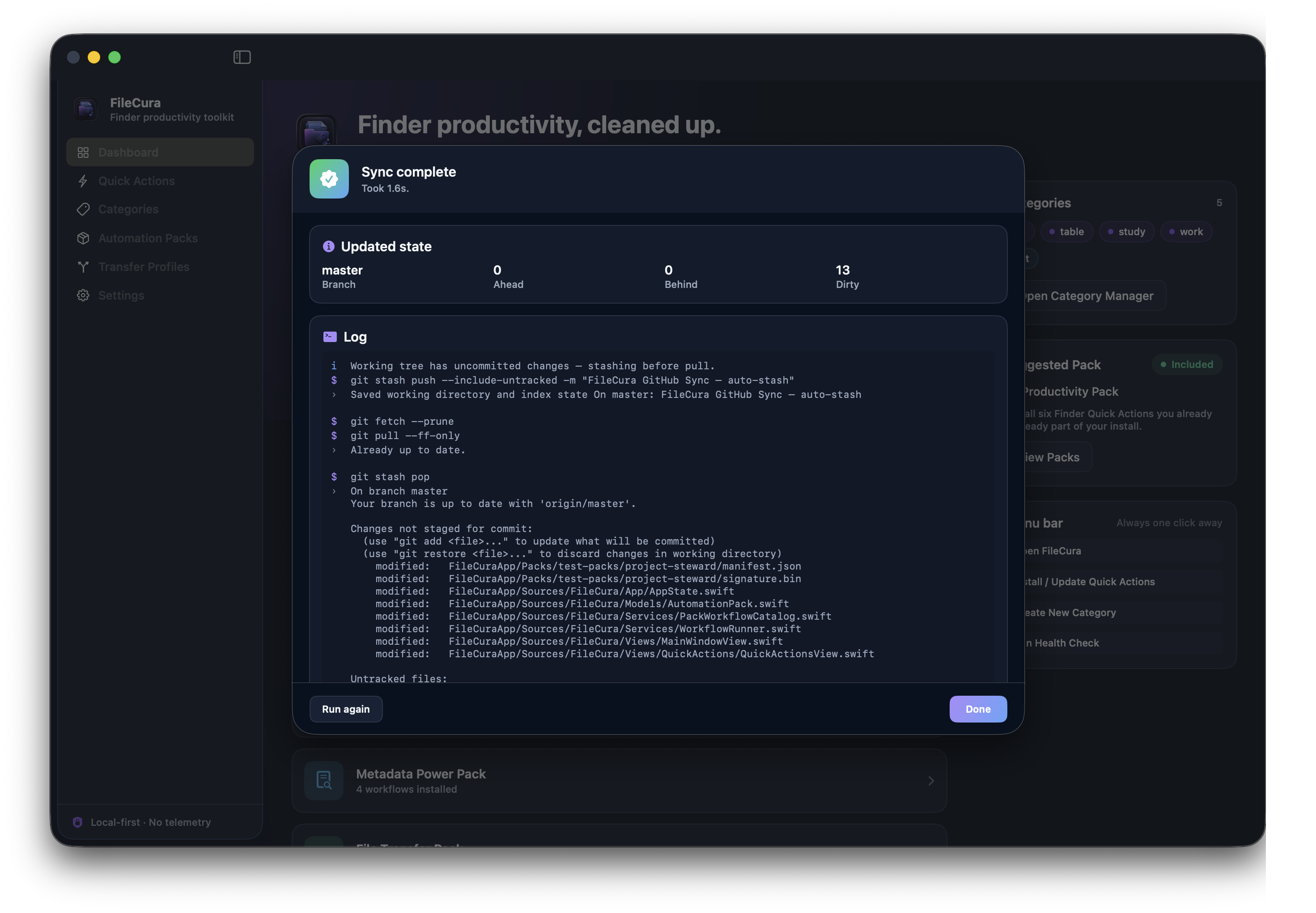
GitHub Sync sheet — Current state with master branch, origin/master upstream, and a 13-file dirty checklist with M / A / D / R badges.

Branch / upstream / ahead / behind / dirty tiles, last-commit summary, checkbox list of dirty files with file-status badges (M / A / D / R / ?), and a monospaced commit-message editor. Safety rules card reminds you no force, no rebase.

Git Full Run — Commit & Push step

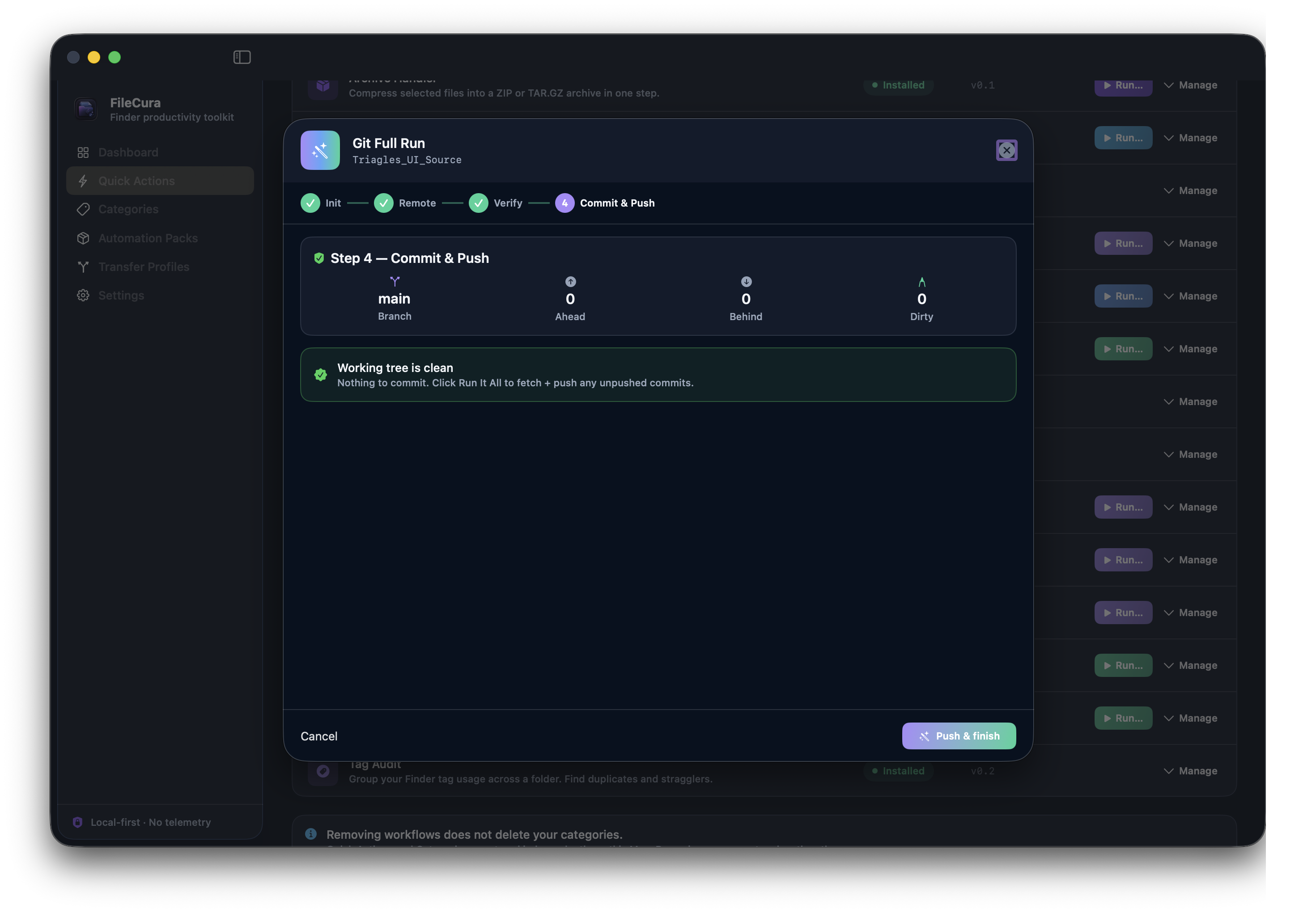
Git Full Run wizard at Step 4 — Commit and Push, showing branch main, working tree clean, with Push and Finish button.

Step chips at the top show wizard progress: Init → Remote → Verify → Commit & Push. Working-tree-clean banner tells you nothing's pending; one click pushes existing commits.

Safe by design

Never touches your editor.

Every Steward workflow respects the editor's managed folders. Project Snapshot excludes Library/, node_modules/, target/, etc. from archives. Stage & Import refuses to write into them. GitHub Sync uses fast-forward pulls only — no merge commits, no rebases, no force pushes. Git Full Run sets GIT_TERMINAL_PROMPT=0 so auth failures surface in the UI instead of locking up the sheet. The whole pack is designed around one rule: your editor still opens the project after FileCura runs.

The day-to-day shape.

Right-click in Finder, or click Run in the app.

1

Pick the project

Right-click the project folder in Finder (or pick it from Recent Projects inside FileCura). The workflow detects the kind automatically.

2

Review the plan

Every Steward workflow shows you what's about to happen before it touches a single file. Safe destination previews, kind-aware excludes, refuse-and-explain on anything dangerous.

3

Confirm and run

One click. Live log. Done view with summary stats and a Snapshot-this-project shortcut so you can rollback if anything looks off.

Two bundles. Pick the one that fits.

Save money vs buying each pack separately. One license file, lifetime, every Mac you own. The two bundles share Hygiene + Metadata; pick by whether you want bulk file moves (Essentials) or project-aware workflows (Complete).

Essentials Bundle

4 packs · 18 workflows · For everyday Mac users.

  • Finder Productivity Pack — seven Quick Actions included free with FileCura
  • File Hygiene Pack — Duplicate Reports, Old & Stale, Large File Finder, Downloads Tidy
  • Metadata Power Pack — Metadata Export / Import, Tag Audit, Comment Templates
  • File Transfer Pack — Smart Mover, Cloud Migrate, Archive Handler, Route by Config
£55 separately
£29
Save £26 (47%)
Buy Essentials Bundle · £29

One license file unlocks Hygiene + Metadata + File Transfer in FileCura. Productivity Pack is included free with the app regardless.

Complete Bundle

5 packs · 24 workflows · Every paid pack at the best price.

  • Finder Productivity Pack — included free with FileCura
  • File Hygiene Pack — Duplicate Reports, Old & Stale, Large File Finder, Downloads Tidy
  • Metadata Power Pack — Metadata Export / Import, Tag Audit, Comment Templates
  • File Transfer Pack — Smart Mover, Cloud Migrate, Archive Handler, Route by Config
  • Project Steward Pack — Snapshot, Detector, Stage & Import, GitHub Sync, Init Repo, Git Full Run
£84 separately
£45
Save £39 (46%)
Buy Complete Bundle · £45

One license file unlocks Hygiene + Metadata + File Transfer + Steward in FileCura. 14-day refund policy. Lifetime license. Email delivery within ~2 minutes.

Want every paid pack? Complete Bundle £45 is the lowest-price path — £39 cheaper than buying all four separately at £84.

Common questions.

Anything else? Email hello@filecura.com and we'll get back to you quickly.

Do I need the free FileCura app first?

Yes. The pack is an add-on for FileCura — it installs new Quick Actions into the existing app. Get FileCura from the main page first; it's free.

Is this a subscription?

No. One payment of £29. The license never expires, never auto-renews, and never asks for your card again.

Will it break my Unity / Xcode / Node project?

No. The whole point of the pack is "your editor still opens the project after FileCura runs." Project Snapshot excludes derived folders so backups are clean. Stage & Import refuses to write into Library/, node_modules/, etc. GitHub Sync never force-pushes or rebases. Init Repo writes a kind-aware .gitignore so your first commit doesn't include build artefacts.

Does it work without git installed?

Snapshot, Detector, Stage & Import work regardless. GitHub Sync, Init Repo, and Git Full Run need git on your PATH — FileCura looks at Homebrew (/opt/homebrew/bin and /usr/local/bin) before the Xcode Command Line Tools (/usr/bin/git).

What project kinds are supported?

Unity, Xcode, Swift Package, Node, Rust, Python, Godot, and generic git repositories. Each has its own routing conventions (subfolder suggestions, ignore templates, derived-path excludes). New kinds added as we hear from users — email us with your stack.

Will GitHub Sync ever overwrite my work?

No. Pulls are fast-forward only — if the remote diverged, FileCura stops and tells you to resolve in your editor. Auto-stash before pull preserves any uncommitted changes; the stash is popped after the pull succeeds, with conflict handling that preserves the stash entry so nothing is lost. Push never uses --force.

I lost the license email. Now what?

Reply to the original Lemon Squeezy order email, or email hello@filecura.com with your order number. We'll re-send the same license file — same buyer ID, no extra charge.

What's your refund policy?

14-day no-questions-asked refund. If Project Steward Pack isn't what you expected, reply to your order email within 14 days and we'll refund in full.

Never lose a project again.

£29 one-time. Lifetime license. Works on every Mac you own. License arrives by email within ~2 minutes.

macOS 14+ Finder Quick Actions In-app wizards Local-first
Buy Project Steward Pack

Already bought it? Email hello@filecura.com and we'll re-send your license file.