FileCura Pack Add-on for FileCura · Requires the free FileCura app.
File Transfer Pack · Add-on for FileCura

Bulk file moves, done right.

Four Finder Quick Actions that replace Finder's per-file conflict roulette and silent copies with a real engineered transfer pipeline: pre-flight planning, grouped conflict resolution, live iCloud sync tracking, ZIP / TAR.GZ archives, and Hazel-style rule-based routing with saveable profiles.

£25 One-time purchase · Lifetime license
Buy File Transfer Pack

After checkout your license arrives by email from licenses@filecura.com. Drag it onto FileCura to unlock. Want all three Automation Packs? See the bundle below.

Workflows 4 Quick Actions
Surface Finder right-click + in-app profiles
Privacy Local-first
Safety Copy first, decide later

Four workflows. One pack.

Each is a Finder Quick Action. Select files or a folder, right-click, and FileCura takes it from there.

Workflow 01

Smart Mover

Pre-flight plan with file count, size, free-space check, and conflict detection. One grouped conflict-policy decision instead of Finder's per-file roulette. Copies first; deletes originals only after you confirm. Optionally annotates source Finder Comments with [Copied to ~/Archive on 2026-06-12] so you have an audit trail.

Workflow 02

Cloud Migrate

Auto-detects iCloud Drive, Dropbox, Google Drive, and OneDrive. Live per-file sync verification window with a 20-second countdown so you can actually see iCloud confirming uploads. When migrating out of iCloud, offers to evict the local cache after copy to free disk space without deleting the cloud copy.

Workflow 03

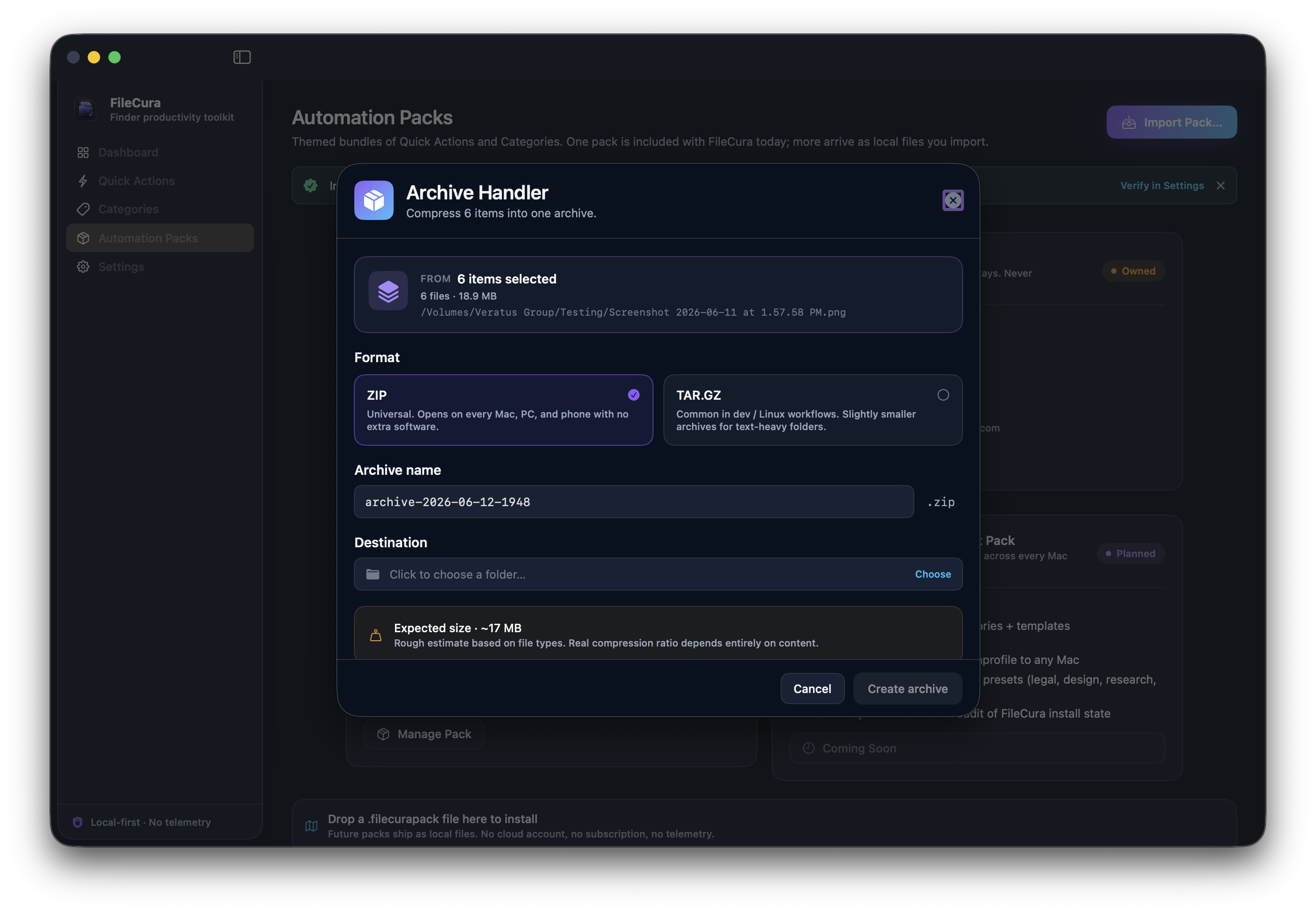
Archive Handler

Compress a selection to a ZIP or TAR.GZ archive in one step. Picks a sensible default name, shows an expected compressed-size hint based on the file types, and produces a summary with the actual saved-space percentage. Optional Finder Comment on the archive recording what's inside.

Workflow 04

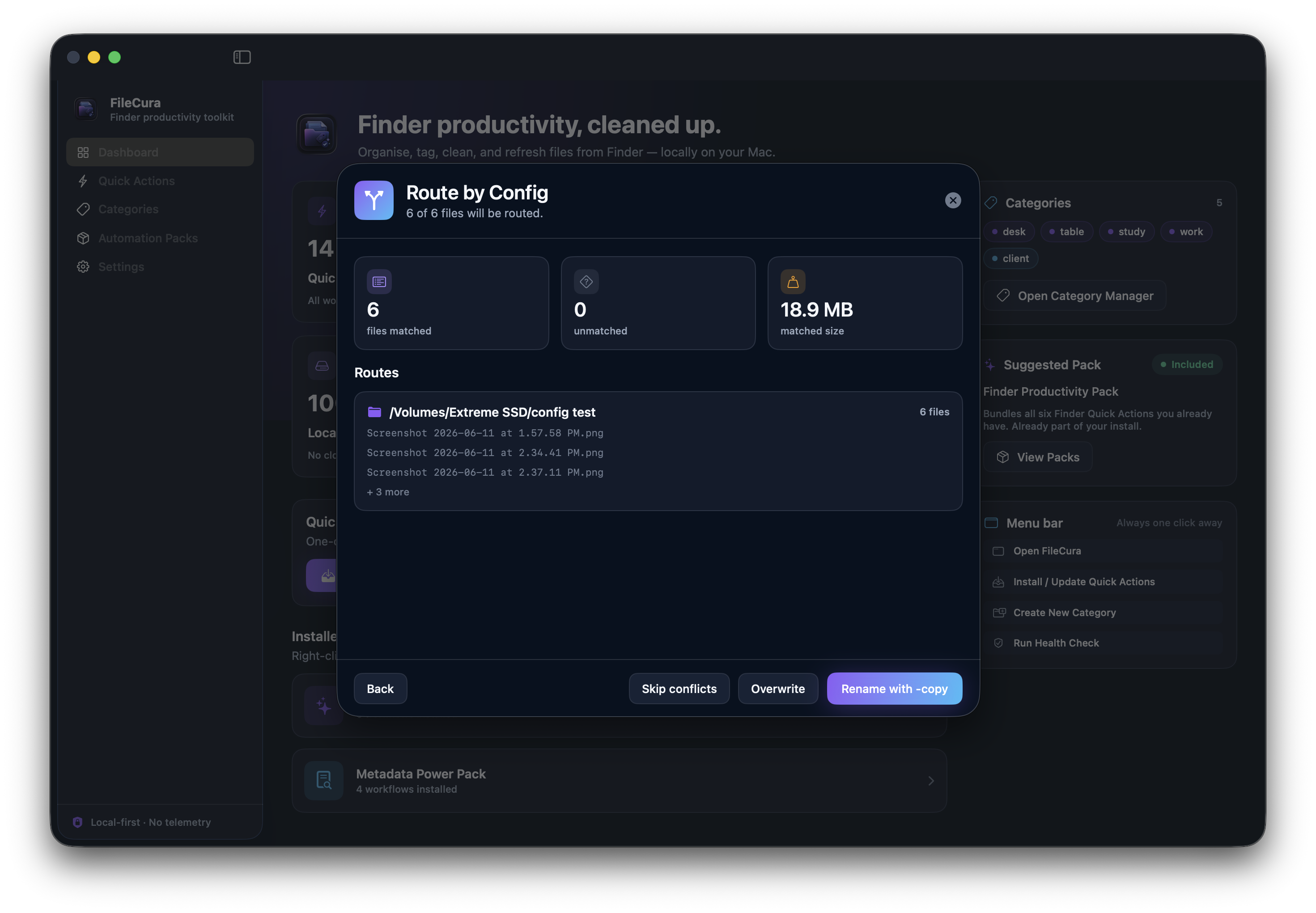
Route by Config

Hazel-style rule-based routing — IF (file extension / name / size / age / Finder tag / comment) THEN (move / copy / skip). Build rules ad-hoc or save them as .filecuratransfer profiles for reuse. In-app profile editor with inline rule authoring. Plan preview groups routes by destination before any file moves.

Safe by design

Copy first. Decide later.

Smart Mover and Cloud Migrate both always copy first and only ask about deleting originals AFTER the copy succeeds. If anything fails mid-transfer, your source files are untouched. Route by Config previews every destination before any file moves, and unmatched files stay where they are by default. Cloud Migrate's "Remove iCloud download" option drops the local cache but never deletes the cloud copy — you can always re-download from Finder.

How you'll use it.

From checkout to first transfer in about two minutes.

Buy the pack

Checkout takes about 30 seconds. Lemon Squeezy handles the payment securely (we never see your card details).

License arrives by email

Within ~2 minutes you'll receive an email from licenses@filecura.com with a .filecuralicense file attached.

Drag onto FileCura

Open FileCura, drag the .filecuralicense file onto the window (or double-click it). FileCura verifies the signature and unlocks the pack instantly. A new Transfer Profiles section appears in the sidebar for authoring routing profiles.

Right-click to run

Select files in Finder, right-click → Quick Actions → pick Smart Mover, Cloud Migrate, Archive Handler, or Route by Config. Review the plan. Confirm. Done.

Want everything?

Bundle all three FileCura Automation Packs for less than buying File Transfer alone, plus.

Complete Automation Pack Bundle

All three packs · 12 workflows · One price.

  • File Hygiene Pack — Duplicate Reports, Old & Stale, Large File Finder, Downloads Tidy
  • Metadata Power Pack — Metadata Export / Import, Tag Audit, Comment Templates
  • File Transfer Pack — Smart Mover, Cloud Migrate, Archive Handler, Route by Config
£43 separately
£29
Save £14
Buy Complete Bundle · £29

One license file unlocks all three packs in FileCura. Same 14-day refund policy. Same lifetime license. Same email delivery.

Common questions.

Anything else? Email hello@filecura.com and we'll get back to you quickly.

Do I need the free FileCura app first?

Yes. The pack is an add-on for FileCura — it installs new Quick Actions into the existing app. Get FileCura from the main page first; it's free.

Is this a subscription?

No. One payment of £25. The license never expires, never auto-renews, and never asks for your card again.

Will it delete my files?

Never automatically. Smart Mover and Cloud Migrate always copy first, then ask whether to remove the originals. Route by Config previews every destination before files move. Cloud Migrate's "Remove iCloud download" option only drops the LOCAL cache; the cloud copy stays intact.

Does it work with iCloud Drive properly?

Yes. Cloud Migrate has a dedicated 20-second sync verification window that polls URLResourceKey.ubiquitousItemIsUploaded to confirm files actually reached iCloud (not just local cache). The window stays open long enough to see the "Synced" badges tick up — no false "Upload failed" like other tools.

How is this different from Hazel?

Route by Config covers the file-routing use case at a fraction of Hazel's price (Hazel is $42 per app), and you get three other workflows in the same pack. FileCura's routing is on-demand (right-click to run) rather than background-watched — you choose when to tidy, instead of an always-on rule engine running behind your back. Different model, different price.

Can I share my routing profiles?

Yes. Profiles export as .filecuratransfer JSON files you can share with colleagues. Paths are tilde-tokenised so they work across different Macs. Profile sharing was designed for teams that want to standardise file organisation.

I lost the license email. Now what?

Reply to the original Lemon Squeezy order email, or email hello@filecura.com with your order number. We'll re-send the same license file — same buyer ID, no extra charge.

What's your refund policy?

14-day no-questions-asked refund. If File Transfer Pack isn't what you expected, reply to your order email within 14 days and we'll refund in full.

Bulk file moves, done right.

£25 one-time. Lifetime license. Works on every Mac you own. License arrives by email within ~2 minutes.

macOS 14+ Finder Quick Actions In-app profile manager Local-first
Buy File Transfer Pack

Already bought it? Email hello@filecura.com and we'll re-send your license file.